SSH_ASKPASS: A Saga in 3 Parts
Behind the scenes dealing with decisions made to secure this website
Table of Contents
Let me take you on a journey. A journey through the world of enabling a graphical UI for ssh PIN requests.
Part 0: The Background
As a security professional, I want to model and practice good security for my own personal website. I don’t have the resources (or need) for a huge identity provider setup. The modern individual equivalent is often enabling something with a YubiKey. 😆 In this case, I want to GPG sign commits to my GitLab Pages repository and ensure that only I can push to the repository.
First I set up my GitLab account to use a Passkey or 2FA with the YubiKey. Following guides elsewhere on the Internet, I generated PGP key material on the YubiKey (something I’ve been meaning to document in detail for over 6 years now) and used a FIDO2 slot to create an SSH resident key on the YubiKey. There’s no point in duplicating my configuration here and Internet search works just as well for you as it does me.
While doing that, I enabled and required PINs for both PGP key usage and SSH key usage. Because of course. I don’t want the loss of my YubiKey to represent the loss of my cryptographic identity or SSH access.
Here’s how my setup operates on a daily basis. When I make a post, I commit that file to my GitLab Pages repo. Git is configured to require GPG signing on each commit (commit.gpgsign true), and that works beautifully with the YubiKey. If I git commit on a command-line, pinentry-gnome3 pops up with a graphical request for the YubiKey and its PIN. I enter the PIN and off it goes. The same thing happens when I hit the “Commit” button in VSCodium—the same pinentry-gnome3 pop-up.
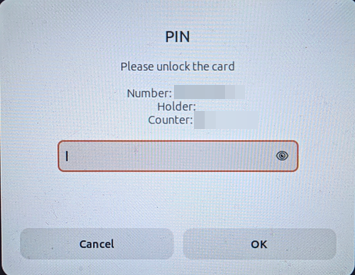
But I don’t have that same experience when running git push. By default, git delegates the connection to ssh, which asks for the PIN. If I run that git push on a command-line, it asks for the PIN in my terminal window. And if I trigger a push from VSCodium, there is no GUI to ask for the PIN. This is a known bug inherited from VSCode, and it has a workaround in VSCod{e,ium}: the use of SSH_ASKPASS plus the following VSC setting:
"git.useIntegratedAskPass": falseThis means that I can’t use the interface I’m in at the time to git push; I always have to use a terminal window. This slows things down.
A quick DuckDuckGo, and great news! There is plenty of guidance for this!
Part 1: The Environment
Google AI Search, half of the StackExchange results, and other sources say that it’s as easy as:
export SSH_ASKPASS=/usr/lib/openssh/ssh-askpass
export SSH_ASKPASS_REQUIRE=prefer
Great! Add that into my .bashrc and I’m done! No need to reboot, just re-source or run those commands directly in the shell I’m already in.
Except, $SSH_ASKPASS is not a valid program!
$ stat $SSH_ASKPASS
stat: cannot statx '/usr/lib/openssh/ssh-askpass': No such file or directory
Looks like I need to find an ssh-askpass binary to use.
Part 2: The Askpass Binary
Let’s install that.
$ apt show ssh-askpass
Package: ssh-askpass
...
Description: under X, asks user for a passphrase for ssh-add
 This is Jim Knoble's implementation of the ssh-askpass program, originally
 called x11-ssh-askpass upstream.  It is built on low-level X11 libraries,
 and therefore has minimal dependencies.
 .
 Other ssh-askpass programs are available, some of which may integrate
 better into various desktop environments.
Hey, wait a minute… “low-level X11 libraries”? “Other ssh-askpass programs… may integrate better”… I certainly want the best integration with my desktop environment! Let’s use something better. What are my options?
The options
What do I have installed already?
$ locate askpass
/usr/lib/git-core/git-gui--askpass
/usr/libexec/gcr-ssh-askpass
/usr/libexec/gcr4-ssh-askpass
/usr/libexec/seahorse/ssh-askpass
Hmmm. I didn’t expect four results. Let’s see what DuckDuckGo and Google have to say about them.
1. Zenity
This is the dark horse option. Quite metaphorically, because it wasn’t in that list, but did come up when I was working through which one to choose. It was recommended to me in a few places, including Google’s AI Search results. From what I know of Zenity it would work… technically… but I don’t want to trust my security to a tool not designed for that purpose.
2. /usr/libexec/gcr{,4}-ssh-askpass
GCR is the GNOME library for handling certificates, interacting with keystores, and providing UIs for crypto operations. These two files are obviously the ssh-askpass for GCR (think GNOME Keyring if the SSH keys were stored there).
A GCR-based ssh-askpass would be perfect! It is purpose-built and obviously is styled like GNOME. So of course there’s something that’s going to foul it up. The problem in this case is gcr-ssh-askpass uses sockets to communicate with the calling application, but SSH expects to receive the passphrase via stdin. So it doesn’t work at all. 😢
3. /usr/lib/git-core/git-gui--askpass
It comes from git, it mentions a GUI… surely that’s our winner!
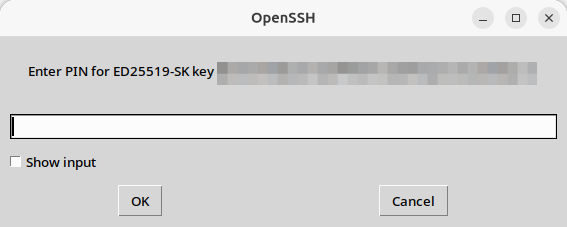
🤮
That’s some of those “low-level X11 libraries” we heard about earlier. It works, at least, so it’s something to consider. But let’s keep looking for those “Other ssh-askpass programs” that “may integrate better” than this one does.
4. /usr/libexec/seahorse/ssh-askpass
Oh, that actually looks great!
But wait, what is this Wayland pop-up that keeps appearing every time Seahorse ssh-askpass comes up?
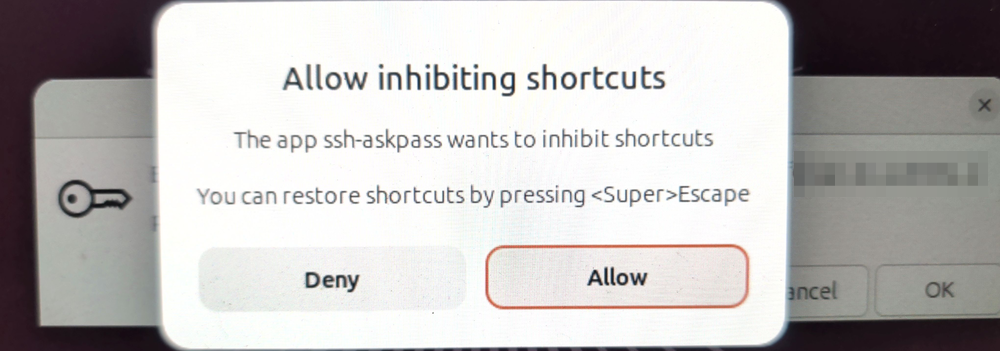
If it was a one-time thing, it would be fine. If it was a per-boot or per-YubiKey insertion thing, I wouldn’t like it, but I could live with it.
But this pops up every. single. time. that I git push. It doesn’t matter if I hit “Deny” or “Allow”. So what’s up with that?
It’s another known bug, this time in Seahorse itself.
Mentioned in that bug report and elsewhere is the workaround to to use a .desktop file. But why is that needed? And what is this pop-up?
Part 3: The Security Alignment Workaround
The pop-up is about security. In X11, the legacy windowing system for Linux and Unix, applications can view anything and everything given the right calls. X11 does not enforce any security. The classic xeyes program demonstrates this well, as the eyes follow your cursor no matter what window you’re in. Wayland fixes this by having applications request permission for cross-application and sensitive behavior. They call these “portals”.
In X11 land, one way to mitigate these security shortcomings is to grab keybindings. Because Seahorse’s ssh-askpass is not Wayland-aware, it tries to inhibit shortcuts, one part of grabbing keybindings. In normal usage this is not a problem because the main Seahorse application already has permission to inhibit shortcuts in the portal. When Seahorse calls its own ssh-askpass, it inherits that permission.
Unfortunately, we do not have that permission. To allow the permission (or disallow; same basic steps) in harmony with GNOME is a bit sideways. We must flow like water.
Create the following file and save it as ~/.local/share/applications/seahorse-ssh-askpass.desktop. You can put this in any FreeDesktop.org applications directory and you should be able to get the same effect. You can rename the desktop file, but you may need to remember the name. The keys that are the most important are Exec and StartupWMClass.
[Desktop Entry]
Name=Seahorse ssh-askpass
Comment=Required so Wayland can bypass the 'Allow inhibiting shortcuts' property on this GUI
Type=Application
Exec=/usr/libexec/seahorse/ssh-askpass
Terminal=false
StartupWMClass=ssh-askpass
# Removes the app icon from the grid; keeps the ability for GNOME to track the WMClass
# Do not use Hidden=true
NoDisplay=true
Let’s run an update to pick up the new file and its settings.
xdg-desktop-menu forceupdateNow you have two paths. You can either run git push, and when the Wayland pop-up appears about the Seahorse ssh-askpass inhibiting shortcuts, you can Allow or Deny as you wish and it will be remembered.
Or you can set it directly without interacting with the GUI (for idempotent setup scripts, as I use).
flatpak permission-set gnome shortcuts-inhibitor seahorse-ssh-askpass.desktop GRANTEDWe’re using flatpak because it allows us the easiest interface with the portal.
After either path—clicking Allow/Deny or setting it directly—we can see if it took. (It will say “DENIED” if you chose that option)
$ flatpak permission-list gnome shortcuts-inhibitor
Table Object              App                                    Permissions Data
gnome shortcuts-inhibitor org.gnome.seahorse.Application.desktop GRANTED     []
gnome shortcuts-inhibitor seahorse-ssh-askpass.desktop           GRANTED     []
There it is!
Run git push again and success! ONLY the Seahorse ssh-askpass prompt appears!
SUCCESS!
And the same thing happens if we try a push from VSCodium (with "git.useIntegratedAskPass": false)!